How to make business account on Facebook: 2026 Full Guide
In the increasingly competitive digital marketing landscape, building a Facebook business account is no longer optional but mandatory for individuals, businesses, and advertisers seeking to build an online brand. Through Facebook’s business management system, you can easily manage Fanpages, ad accounts, and payment methods, and assign permissions to personnel professionally and securely.
However, many beginners still face difficulties in the business account setup process due to not clearly understanding the necessary steps or incorrect initial configuration. This can lead to restrictions in running ads and even affect the account’s credibility later on.
In this article, BlackHatWorld will guide you on how to create a Facebook business account in 2026 in the most complete and detailed way, from preparing personal accounts, setting up Business Manager, to adding Fanpages to manage Facebook ads for optimizing CPA and ROAS.
Reasons why Facebook Business accounts become important?
When we work with many businesses and advertisers, a common point is that personal accounts used for running ads often quickly face restrictions. Meanwhile, the Facebook Business account system offers many management, security, and campaign-optimization tools that are much better. Below are the important reasons why Facebook Business accounts are increasingly becoming an indispensable platform.
Professional and centralized advertising management
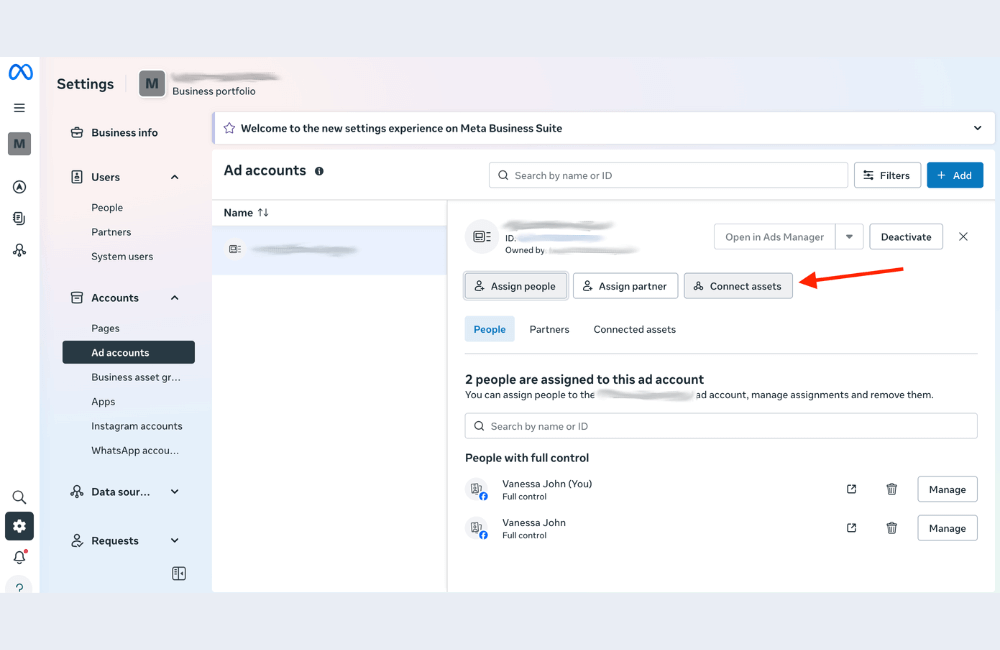
One of the biggest benefits of Facebook Business is the ability to manage all advertising activities within a single system. Instead of having to log in to multiple accounts or share passwords among team members, you can manage all Fanpages, ad accounts, and marketing assets in the same dashboard.
Additionally, when we work with marketing teams of 3 to 10 people, Facebook Business allows for very clear permission settings. One person can solely manage Fanpage content, another can be in charge of advertising, and a senior manager can control the entire account.
Increase credibility and limit the risk of account locks
A problem that many advertisers face is personal accounts being restricted or banned from advertising. This often happens when accounts are new, lack activity history, or run ads with large budgets in a short time. Facebook Business accounts help significantly reduce this risk because the system is designed specifically for businesses. When we fully set up business information, verify domains, and complete business verification, the account will have higher credibility in the eyes of Facebook’s system.
Manage multiple Fanpages and ad accounts simultaneously
For businesses or marketing agencies, managing multiple advertising projects simultaneously is common. This is when the Facebook Business account clearly demonstrates its power. Advertisers can create different ad accounts for each product, brand, or market. For example, a company can have a Fanpage for the Vietnam market, another Fanpage for the US market, and a separate Fanpage for new products.
Consequently, we can separate budgets, advertising strategies, and customer data for each campaign. This makes marketing performance analysis clearer and reduces the risk of mutual interference between campaigns.
Better account and data security
Security is an extremely important factor when operating advertisements. If using a personal account to manage the entire marketing system, a business may face great risks when employees quit or when the account is compromised.
Facebook Business provides multiple security layers to solve this problem. Advertisers can enable two-factor authentication for all members, limit access permissions, and control who can change account information.
Support for data and advertising campaign optimization
Facebook Business also provides many powerful tools to help advertisers optimize campaigns. Tools such as Facebook Pixel, Conversion API, or Custom Audience are all centrally managed within the Business Manager system. As a result, advertising costs often decrease significantly because ads are shown to the right audience with a high likelihood of purchasing.
Creating a long-term development foundation for businesses
A Facebook Business account is not just an advertising tool but also a platform for businesses to develop a long-term marketing ecosystem. When we build the system correctly from the start, businesses can expand advertising to Instagram, Messenger, WhatsApp, and many other platforms within the Meta ecosystem. This makes market expansion and revenue growth easier.
How to make business account on Facebook: 2026 Full Guide
Creating a Facebook business account helps you clearly separate personal activities from business operations. At the same time, this system allows businesses to manage Fanpages, ad accounts, customer data, and employee access permissions within the same control center. Below is a detailed step-by-step guide to help advertisers set up a Facebook Business account correctly.
Step 1: Create a Facebook Business account
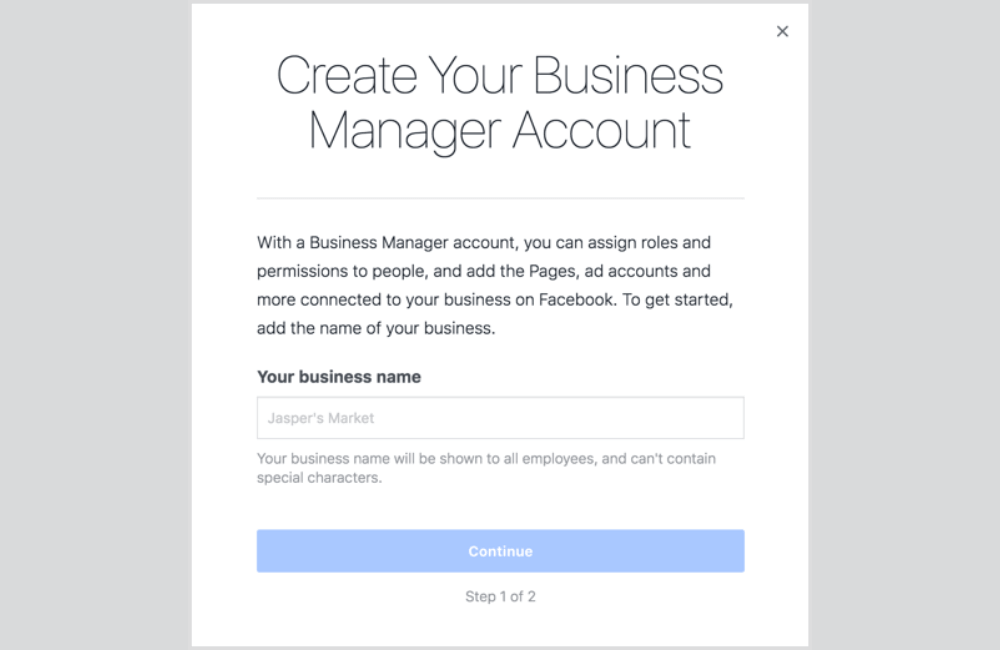
Businesses need to create a Facebook Business account to start managing all business marketing activities. This is the platform that helps you control multiple Facebook pages, multiple ad accounts, and other digital assets without depending entirely on personal accounts. How to perform:
1. Access the business.facebook.com page.
2. Click the Create account button.
3. Log in with a verified personal Facebook account.
4. Enter business information including:
- Business name matching the business license
- Official contact email of the business
- Country and other basic information
5. Click Submit to complete the account creation process.
Additionally, it is necessary to double-check the business name to ensure it matches legal documents. This will help the later business verification process happen faster and reduce the risk of being rejected by Facebook.
Step 2: Create Business Manager
After creating a Business account, the system will take you to the business management interface, also known as Business Manager. This is the centralized place to manage all business assets on Facebook. How to perform
1. After creating the account, access Business Manager.
2. Enter basic information, including:
- Business Manager name, usually matching the business name
- Management email, usually the company email
3. If requested by Facebook, select the business type such as:
- Local Business
- Online Store
- Brand
We recommend that you only add members who are truly necessary to the system. Additionally, ensure the management email is always active to receive important notifications from Facebook. Many businesses have missed system warnings simply because the management email was no longer in use.
Step 3: Connect Facebook page and add ad account
After setting up Business Manager, the next step is to connect the Fanpage and ad account to the system. This is a very important step because it helps the business manage advertising campaigns in a centralized and professional manner. How to perform
1. Access the Assets section and select Pages.
2. Choose one of the following two options:
- Add an existing page if the business already has a Fanpage
- Create a new page if you do not have one yet
3. Fill in basic information for the Fanpage, such as:
- Profile picture
- Cover photo
- Short description
- Contact information
4. Go to the Ad accounts section.
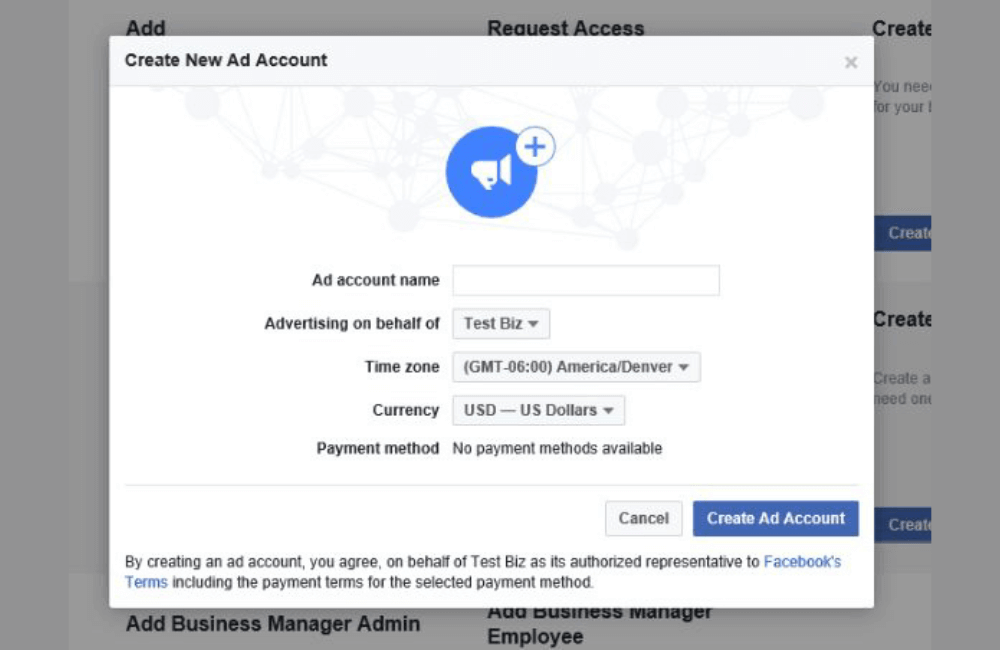
5. Select Add an ad account.
6. Enter an existing ad account ID or create a new ad account.
In this step, you can also assign permissions to each member such as administrator, editor, or analyst. This helps the business clearly control access and avoid the risk of losing management rights.
Step 4: Set up payment methods
1. Access Business settings.
2. Select the Payment methods section.
3. Add payment information including:
- Credit card
- Debit card
- Or bank account
4. Confirm the newly added payment method.
Businesses should use cards in the business name to make verification easier for Facebook. Additionally, advertisers should add at least two backup payment methods to avoid cases where cards are declined or expire while campaigns are running.
Step 5: Business verification and account security
The final but very important step is business verification and setting up security layers for the account. When a business is verified, the Facebook system will rate the account with higher credibility and allow access to many advanced features.
1. Access Business settings.
2. Select Business info.
3. Upload legal documents such as:
- Business license
- Utility bills
- Or other documents proving the business operates legally
4. Enable two-factor authentication for personal accounts and Business Manager.
5. Re-check the access permissions of each member in the system.
An important note is that for newly created Business Managers, the business verification option may not appear immediately. In many cases, advertisers need to have a certain activity history or a minimum level of ad spend before Facebook displays this feature. Therefore, please be patient in building stable advertising activities so the system unlocks all necessary features.
Creating a Facebook business account correctly is the foundational step that helps you and advertisers manage marketing activities professionally and securely. When using the Business Manager system, businesses can control Fanpages, ad accounts, personnel, and customer data within a single platform, thereby reducing the risk of account restrictions and optimizing advertising campaign effectiveness. If set up properly from the start, the business’s advertising system will be more stable and ready to scale when there is a need to increase budgets or deploy multiple marketing campaigns in the future.
Frequently asked questions
Yes. A business can create multiple different Business Managers; however, Facebook usually limits the quantity depending on the credibility of the personal account. In practice, many advertisers use 2 to 3 Business Managers to manage different campaigns or projects
It is possible, but in many cases, Facebook will require additional verification steps such as identity verification or business verification. Therefore, you should complete the business information, set up payment methods, and enable two-factor authentication to ensure the ad account operates stably.
💬 Contact now for free consultation from BHW!
- Website: https://vi.blackhatworld.io/
- Telegram: @bhw_agency
- Whatsapp: +84819001811
- Wechat: bhwagency
- Email: [email protected]
This article is also available in other languages: