What Is Audience Network Facebook Ads? A Beginner’s Guide to Expanding Your Reach
This is a critical topic for those who want to insert ads into their apps or display ads on various platforms such as AdMob, Aton, or any other advertising system. The solution now is the Facebook audience network. This powerful platform allows you to connect and expand your ads beyond Facebook, helping you reach more users across the entire digital ecosystem.
If you are looking to expand your reach, especially in the context where broad targeting Facebook is not effective for a specific industry, then you are in the right place. In this article, BlackHatWorld will provide a detailed guide on how to expand ads through the Facebook audience network, helping advertisers maximize the platform’s power to increase revenue and grow their pool of potential customers.
What Is Audience Network Facebook Ads?
Imagine it this way: we are the owners of a website or a mobile application. On that platform, we are providing useful products, services, or content to users daily.
Now, let’s think a bit further: if there are millions of visits to our website or application every day, is there a way to earn additional revenue from this enormous traffic? The answer is absolutely yes, and Facebook Audience Network (FAN) is the solution for that. This is Meta’s extended ad display network, which allows advertisers to display ads outside the Facebook platform, on partner mobile applications and websites.
The way Audience Network works is very simple. When you set up an ad campaign on Facebook, you can choose to expand the display scope to Audience Network. This helps your ads reach users even when they are not on Facebook, for example, when they are playing games, reading the news, or using other apps integrated with FAN. Specifically, Facebook uses its massive user data system, including age, gender, geographical location, and interests, to ensure ads are displayed to the right people at the right time, bringing maximum efficiency to every campaign.
When should I use Facebook Audience Network?
Audience network does not always need to be enabled, but it makes a lot of sense in certain situations. Here are the cases where you should consider using FAN:
When you have achieved high profit and want to scale
If your Facebook campaigns have consistently generated a stable return on investment (ROI), for example 7:1 or higher, but the number of conversions has not increased after 90 days, that is a sign you should enable Audience Network. FAN will help extend your reach beyond Facebook, helping the campaign acquire new customer segments while still maintaining cost-effectiveness.
When you want more effective remarketing
Audience Network is an excellent choice for remarketing campaigns because many people who have previously engaged with you on Facebook may no longer use the platform frequently. Thanks to FAN, your ads can still appear on the apps or websites they are using, ensuring the message is reinforced and increasing the conversion rate.
When you need to choose the right type of ad placement
If you use Audience Network, prioritize native ads, banner ads, and interstitial ads – these are the three formats that bring the highest return on investment. Conversely, rewarded video ads generally do not yield good results for the majority of commercial ad campaigns, so we recommend against using them unless you are developing a game.
When you are a game developer
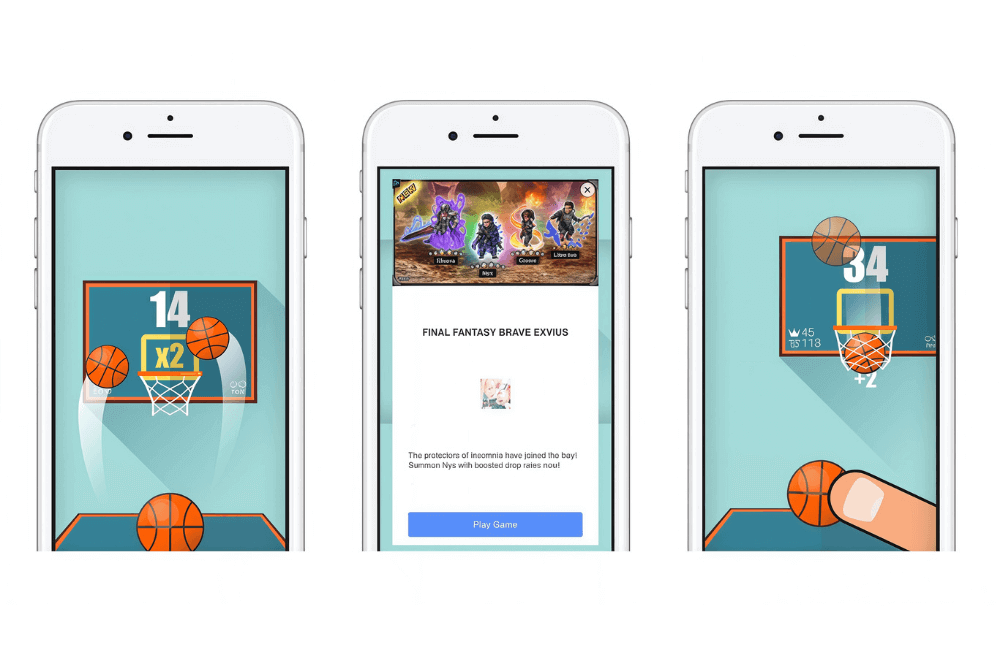
You can monetize free games by integrating Rewarded Video Ads. When players finish watching the video, they will receive in-game rewards, which both enhance the user experience and bring in stable revenue.
When you develop a news application
Use Native Ads; this is a type of ad that blends naturally into the article content. This helps maintain a seamless reader experience while generating revenue from traffic without annoying users.
When you develop an e-commerce application
Interstitial Ads will be very suitable for cross-promoting products within your app. For example, when a user completes a purchase, an interstitial ad can introduce related products, thereby increasing upsell opportunities.
Steps to Expand Reach with Facebook Audience Network Ads
To help advertisers expand their reach and maximize revenue from their apps, Facebook Audience Network (FAN) is an essential tool. Below, we will guide you through detailed steps to integrate and deploy FAN ads most effectively.
Preparation before Integration
Before starting, we encourage you to prepare thoroughly so that the integration process goes smoothly. Specifically, you need to:
- Create a Facebook Developer account: This mandatory account helps you manage your app, track data, and connect with Meta products.
- Develop the app at the test version level and register it on the Meta App Dashboard to be able to configure advertising features.
- Install the appropriate Facebook SDK for the platform you are using, which could be Android, iOS, or Unity.
Example: If you are developing a mobile game on Android, you need to download the Facebook SDK specifically for Android to ensure ads are displayed correctly.
Register Your App
After preparation, we proceed to register the application on the Facebook App Dashboard:
- Access the Facebook App Dashboard.
- Click on “Create App” and follow the instructions to complete the registration.
- After creation, select the Audience Network section in the dashboard.
- Perform the setup steps and click “Get Started” to begin the configuration process.
We recommend that you give the app a clear name, closely associated with the brand or product, for easy management and review.
Integrating the Facebook SDK
Depending on the development platform, the method for SDK integration will differ slightly. Below is the basic guide:
For Android:
- Add the necessary code snippet to the build.gradle file.
- Initialize the SDK in your Application Class to activate the advertising feature.
For iOS:
- Add the Audience Network SDK to the Podfile.
- Run the pod install command to install.
- Initialize the SDK in the AppDelegate to complete the integration.
For Unity:
- Download the Audience Network Unity Plugin from the Meta for Developers page.
- Import the .unitypackage into your project.
- Configure the SDK directly within the Unity Editor.
Example: if you are a Unity developer creating a mobile game, properly integrating the SDK will help Rewarded Video ads run stably and generate better revenue.
Deploying Ad Formats
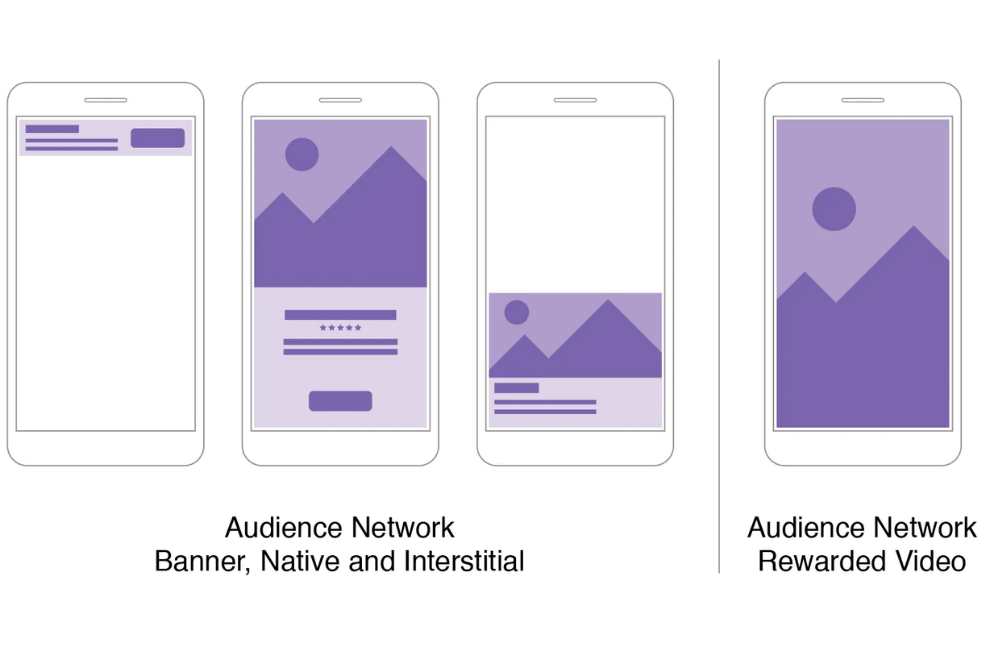
After the SDK is successfully installed, we can deploy various ad formats supported by the Facebook Audience Network. There are 4 main types:
- Banner ads: banner-style ads displayed at the top or bottom of the screen, suitable for news or utility apps.
- Interstitial ads: full-screen ads that appear when the user switches pages or completes an action within the app.
- Rewarded video ads: Rewarded video ads are very popular in games, where users watch the entire video to receive a reward, such as coins, items, or extra plays.
- Native ads: Ads that naturally blend into the app interface, providing a smoother user experience and causing less annoyance.
Depending on the type of app, you can flexibly combine multiple formats to increase revenue efficiency.
Integration testing
Before displaying real ads, we recommend running test ads to ensure everything operates stably. Specifically, you should:
- Use Facebook test ads to check display capability.
- Ensure all ad formats are displayed in the correct positions without errors.
- Check how the application handles ad loading errors to avoid interrupting the user experience.
Example: If you see the video ad failing to load, recheck the SDK or the application’s network access permissions.
Apply for review
After successful testing, you need to submit the application to Meta for review before the ads can be genuinely displayed. The steps include:
- Accessing the Audience Network section in the Meta App Dashboard.
- Providing complete information: application description, ad placement, test accounts, and illustrative screenshots.
- Clicking Submit for Review to send for approval.
Meta will review your application to ensure compliance with advertising policies and the best possible user experience.
Performance tracking
Once the app is approved, you can start running real ads and generating revenue. Don’t forget to track campaign performance using the Audience Network Insight Tool available in the Meta Dashboard. Here, you can view:
- Revenue earned from each ad format.
- Impressions to measure reach.
- Performance metrics such as CTR, CPM, or video completion rate
If you notice that rewarded video ads have a low view rate, try adjusting the in-game reward or the placement to attract more users.
Facebook Audience Network is a powerful tool that helps advertisers expand their reach beyond the Facebook platform, bringing ads to users on thousands of partner apps and websites. When implemented correctly, it not only helps increase impressions and conversion rates but also significantly optimizes ad costs. If you are looking to expand your media campaign outside the Facebook limit, then Audience Network is the ideal choice to start.
Frequently asked questions
Yes. Whether you are a small business or a major brand, Audience Network offers benefits in expanding display reach and optimizing ad costs, provided you correctly identify the target audience.
Not necessarily. If you are only running ads through Meta’s ads manager, you do not need to know programming. However, if you want to integrate ads directly into an application, you will need technical support from a developer to install the SDK and configure it correctly.
💬 Contact now for free consultation from BHW!
- Website: https://vi.blackhatworld.io/
- Telegram: @bhw_agency
- Whatsapp: +84819001811
- Wechat: bhwagency
- Email: [email protected]
This article is also available in other languages:


