Top Facebook Game Ads List Utilizing Interactive Creatives
Typically, experts and influencers in the field of creative advertising frequently discuss DTC, E-commerce, or CPG. However, based on what we have observed from some major clients and brands spending substantial ad budgets, apps and games are an incredibly vast field. Although some principles and ad formats have similarities between CPG and E-commerce, the app and game sector possesses many new, creative, and potential-filled formats.
In this article, BlackHatWorld will guide you to explore types of effective game ad content on Facebook, helping to drive app downloads, registrations, and many other objectives. Whether you are running app ad campaigns, games, or collaborating with CPG brands as a creator, this is an opportunity to expand your scope of work and improve your ad performance.
Top Facebook Game Ads List Utilizing Interactive Creatives
Let’s discover the forms of gaming ad content on Facebook that are bringing the highest efficiency! We will go through each creative type, explain why they work well, and provide practical examples from campaigns we have implemented for major clients.
The Grid format
The Grid format is not a new thing. It has existed since the age of print media, but psychologically, this format is extremely effective. Our brains love grids because they create a subconscious loop; the eyes naturally scan from left to right and from top to bottom, creating a pleasing visual experience.
This is an excellent ad format if you have multiple products, a bundle, or want to display the same product multiple times in a visually satisfying way. In our campaigns, the grid format works best when combined with a clear message. For instance, when testing various messages about the game, we found that the message about a “10-minute workout routine” brought the highest ROAS and engagement, reaching the broadest customer segment.
Employee-Generated Content (EGC)
This year, EGC is a completely new trend. Instead of just using “founder ads,” many big brands like Jenny Kane have tried using employee content, from the warehouse or office backstage.
For example, Hollow Socks, Overnight Oats, and Happy Mammoth have leveraged this content to create an authentic feeling for their ads. Interestingly, EGC works well with both photos and videos. If you do not have a real warehouse to film, platforms like Storyblocks will help you find 4K/HD footage, templates, music, and free effects, helping to create content almost instantly, reducing the workload for the marketing team.
Formula-based Founder Ads
Founder Ads are a form of low-fidelity video filmed by the founder, combined with a TikTok-style chat frame to address a common customer objection. Examples include worries about price, quality, or repeated questions. In the campaigns we roll out, videos directly addressing this objection consistently improve CTR and ROAS. This is a simple yet highly effective formula for small campaigns or startups.
Creator Content
In 2025, creator content remains crucial. We recommend using authentic creators instead of UGC actors. A testimonial from a single person creates a more genuine connection than aggregated ones from multiple people. Some effective hooks we recommend are:
- Unexpected reaction
- Emotion-triggering keywords
- Storytelling following the problem → solution approach
For businesses spending 300–500K USD per month on Meta ads, Creator Content is almost an essential “background track,” and tweet frames or social media overlays are also very popular.
AI Advertising
AI currently provides extensive support in creating quick and cost-effective ads. We divide AI ads into 5 categories:
- AI in design/video tools like Canva, Premiere Pro, CapCut, Meta Ads Manager
- Image generation AI, like Midjourney
- Deepfake or AI avatars (like Arc Ads)
- Voice-over generation AI (11 Labs)
- End-to-end ad production AI systems (like Airpost)
AI helps us test hundreds of creatives in just a few hours, shortening the campaign deployment time while optimizing the budget effectively.
Text-based Ads
Text-based formats can be images with text or video overlays with text. They perform extremely well during sale seasons like Black Friday and Cyber Monday. In the campaigns we deploy, this text format yields a low CPA cost while still attracting a large amount of engagement.
Dynamic Product Ads (DPA)
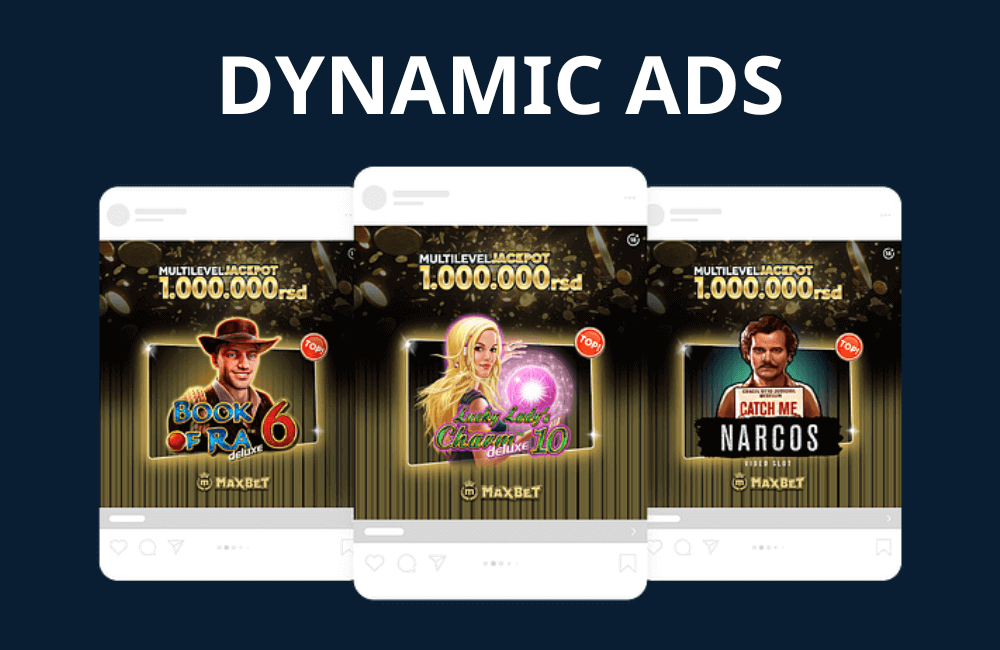
DPA (Dynamic Product Ads) is an extremely effective ad format for gaming businesses advertising various character models or new options. The algorithm automatically optimizes the ad based on catalog data, helping to save time and increase sales. We advise advertisers to meticulously manage the catalog, updating new products and variants regularly. Dynamic Product Ads are highly suitable for businesses running legal real-money casino ads on Facebook. In this case, customers can see all the game categories in your online casino.
Negative Marketing Ads
Negative marketing ads use negative messages to attract attention. For example: 1-star reviews, strong keywords such as regret, embarrassed, hate. In our test campaigns, this message format significantly increases CTR and engagement when combined with the appropriate visuals.
Ugly Ads
Meta calls this low-fi content. An ad format intentionally “ugly,” raw, and authentic, but creates an organic feel. Common formats:
- Post-it note photos
- 1-take videos, direct addressing
- POV of the product in action
- Ugly but outstanding “vintage”-style graphics
The goal of ugly ads is to be authentic, fast, and unpolished. In many cases, this is the ad format that generates better attention than polished creatives.
Simple steps to create Game Ads on Facebook Ads Manager
When starting to run ads for applications or games on Facebook, you and other advertisers first need to prepare two basic accounts. One is the Meta Ads Manager account, and the second is the Facebook Developer account. Meta is the company that owns both Facebook and Instagram, so if you want your ads to appear on both platforms, you need to set up a complete account here. If you do not have an account yet, create one before starting or contact BHW Agency immediately to get a quality BM for your business!
BlackHatWorld Agency, with over 10 years of in-depth experience in the online marketing field, is proud to provide comprehensive Facebook app advertising support services.
We provide diverse ad accounts with various time zones and flexible currencies, including account types such as BM2500, BM5000, and invoice accounts. This helps you launch campaigns stably, effectively, and minimize the risk of being restricted or disrupted.
To enter Ads Manager, you only need to search for “Facebook ads manager” on Google and click the first result. This is where we will set up the first ad campaign. The ad creation process consists of two steps: the first step is setting up the ad in Ads Manager, and the next step is using the Facebook Developer account to add the SDK to the application. If you skip this step, you will easily encounter errors during the ad run.
Step 1: Setting up the campaign in Ads Manager
In Ads Manager, click Start Now to begin. If you have run ads before, the interface may look different depending on the existing campaigns. To create an app ad, click Create, select App Promotion because our goal is to promote the application, then select auction for automatic setup, and click Continue.
The ad setup process is divided into three stages. You can name each stage after the application’s name for easy identification. For example, if promoting a law application, we can name the stage “Law App Stage 1.”
At this stage, select the app category. If the application relates to social issues, housing, employment, or similar fields, you should choose the appropriate category. If not, you can skip this step.
Phase 2 is when you select the app you want to promote. If the app is already on the Play Store, you can search by name or the app’s URL. Simultaneously, select the country where the app is available and the advertising objective, for example, maximizing installs or in-app events.
Next is setting up the budget and ad running duration. You can select the daily spend amount, start date, and leave the end date blank if you want to stop the ad at any time. Additionally, you can refine the ad audience, such as location, age, language, and target customer group.
Step 2: Create ad content and connect with Instagram
Phase 3 is the most detailed customization section. Select the Facebook page representing the app, and connect with the Instagram account if necessary. Start creating the ad by selecting the ad type, image, or video. We often use Canva to create short videos that attract viewers. Choose an image or video from the library or upload a new one.
Add Primary Text and a Headline for the ad. The primary text should be a short description of the app, and the headline must be attractive so viewers want to click the ad. Select a Call to Action, for example, “Install Now” for users to install immediately. You can add multiple text variations for Facebook to automatically test effectiveness. If the app is on the App Store or Play Store, add a direct link for users to access quickly. Then preview the ad on both Facebook and Instagram.
Step 3: Set up the SDK via Facebook Developer
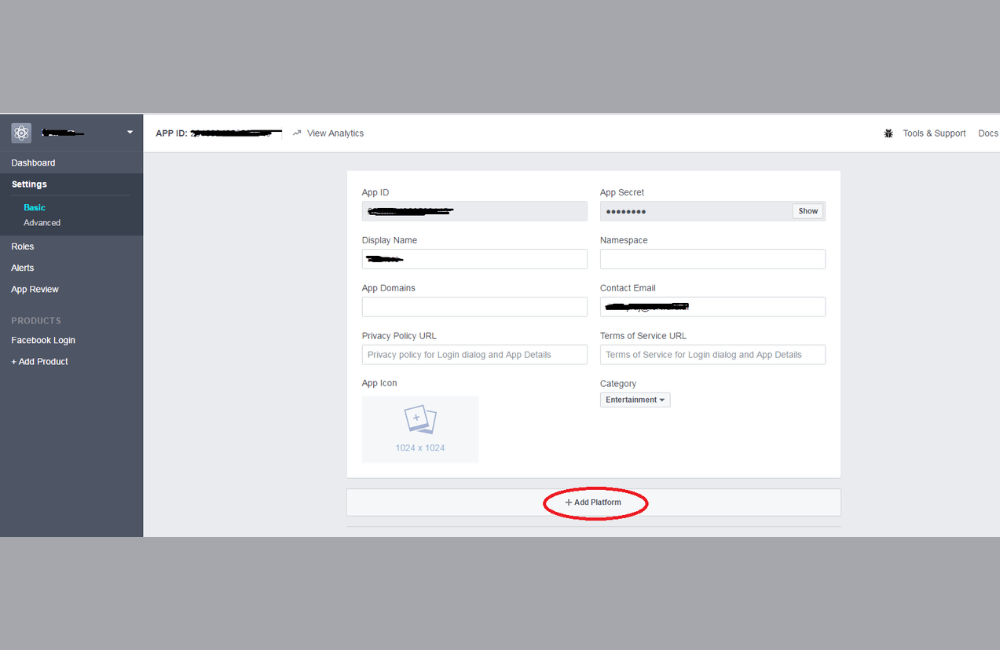
In the Facebook Developer account, create a new app to add the SDK. Select the app type as Customer, enter the app name, select the representative Facebook page, and create the app. Fill in all basic information, such as the terms of service URL, privacy policy, data deletion instructions, and app category, for example, “Education” for a law app.
Add the app platform, select the store, and fill in the package name and class name information from the app source code. Add the app icon in the required size. After completion, switch the app to Live mode. If you encounter a broken URL error, ensure the app is still active on the store. Once the SDK has been added to the Developer Account, return to Ads Manager and select the added app to proceed with campaign creation.
Step 4: Finalize and optimize the ad
An important note is that if the Ad Manager account still has an outstanding ad balance, you will not be able to create a new campaign. Therefore, be sure to update the payment information and billing address. When everything is ready, click publish to launch the ad.
Optimize the ad by providing multiple images, video, and text options so that the Facebook Ads Manager can use AI to automatically optimize ad performance. You can test multiple variations to determine the content that yields the best installs, engagement, and ROAS.
Applying interactive creative ideas in Facebook game ads not only helps increase downloads and sign-ups but also enhances the player experience, thereby optimizing campaign effectiveness. By learning from top-performing ads, you can develop engaging content that attracts and retains users long-term.
Frequently asked questions
Yes, interactive creative ideas for game ads can be applied to both Facebook and Instagram. Since Meta owns both platforms, when you create a campaign in Ads Manager, you can choose to display the ads on both Facebook and Instagram simultaneously. However, you should adjust the images, videos, and text to suit each platform’s display format to ensure the best user experience.
To measure the effectiveness of game ads using interactive content, you should track key metrics such as downloads, CTR, CPA, and in-ad engagement, including video views, clicks on interactive features, polls, or mini-games within the ad. Additionally, you can use Facebook analytics or app analytics to monitor user behavior after downloading the app, thereby evaluating the retention rate and ROI of the campaign.
💬 Contact now for free consultation from BHW!
- Website: https://vi.blackhatworld.io/
- Telegram: @bhw_agency
- Whatsapp: +84819001811
- Wechat: bhwagency
- Email: [email protected]
This article is also available in other languages:


