Mastering Facebook Ad Guidelines in 2026: A Full Guide
Facebook Ads in 2026 are no longer a “just run it and get orders” game. Algorithms are smarter, policies are stricter, and even a single mistake can result in ad rejection or account restriction. Therefore, mastering Facebook advertising principles is no longer an advantage, but a requirement for every advertiser.
In this article, we will outline the latest updated Facebook advertising principles for 2026, covering content policies, special Facebook ad categories, and safe messaging techniques, as well as common errors that can cause accounts to be disabled, which many advertisers still make. If you want to run ads stably, scale sustainably, and avoid continuous appeals, this is the complete guide you should not miss.
Core concepts in the Andromeda era of Facebook Ads
Before diving deep into strategy and ad deployment during the Andromeda phase, we want you and advertisers to firmly grasp the three most important concepts that Meta is operating around. If misunderstood or grasped superficially, it is completely understandable why many campaigns look “profitable” initially but collapse when scaling.
What is Signal in the Meta Andromeda context?
A signal can be simply understood as the user behavior data that your ad sends back to the Meta algorithm through the actual performance of the creative.
The process happens continuously as follows: The ad is distributed → users see the creative → they click, watch, buy, or ignore → the system records that behavior → the algorithm adjusts ad distribution in real-time, within just a few milliseconds. A signal is not just a click or an order. More importantly, it tells Meta:
- Who clicks or buys
- Whether they make decisions quickly or slowly
- How long does it take from viewing the ad to conversion
- Whether that behavior repeats among similar people
For example, two ads both generate orders, but:
- One ad creates an order within 5 minutes after clicking
- Another ad takes 3–5 days of retargeting to generate an order
These two signals are completely different in the eyes of the algorithm. Thus, a Signal is user behavior that helps Meta predict whether continuing to display your ad will generate valuable results. Throughout the process of running ads in the Andromeda era, you will see us mention the word “signal” a lot, as this is the foundation of every distribution decision.
What is Trust? Why does it determine scaling ability?
If signal answers the question “does this ad generate behavior?”, then trust answers a more important question: Is it safe to scale this ad? Many advertisers have encountered a familiar situation:
- The first 3 days, ROAS is very beautiful
- The 4th day starts to fluctuate
- After a week, costs increase, orders decrease, and the campaign “fails”
The main reason is that the ad has a signal but does not yet have trust. Trust here is just like in real life, the level of confidence Meta has that:
- Your ad can repeat the same type of signal over time
- That behavior comes from similar user groups
- Users make relatively stable decisions
- The ad does not generate negative feedback, such as reports, hides, or quick bounces
In other words, Meta is always looking for consistency. When the system sees that the same type of people continue to click and continue to buy with similar behavior, trust will be built. And when there is trust, the ability to scale is truly unlocked.
Testing Ad set in 2026
Testing today is no longer about comparing background colors, changing fonts, or adjusting CTA buttons for aesthetics. Those things have almost lost their meaning at the algorithmic level. Testing in 2026 is signal discovery, which is the process of discovering the user behaviors that your creative triggers. We do not test to find the “most beautiful” ad; we test to answer questions such as:
- Who is clicking this ad?
- Who is actually buying?
- Do they buy immediately or need time to think?
- Is that behavior repeatable?
Previously, the common approach was:
- Stuffing many ads into one ad set
- Waiting for whichever has a good ROAS to increase the budget
Currently, the core goal is to understand the nature of behavior, not just looking at surface numbers.
Practical examples
To help you visualize, we take three common practical examples.
Example 1: Winter bikini ads for women
Spent 500 USD, generated 700 clicks, low CPC, but only 4 orders. Users clicked out of curiosity, with no real purchase intent. Behavior is inconsistent, depending on emotions and branding.
=> Signal exists, but trust is low, cannot scale.
Example 2: “Top 6 anti-wrinkle collagens”
Spent 500 USD, about 1,000 clicks, 8 orders, ROAS is decent. Users are middle-aged women in the research stage; their behavior is quite stable and repeatable.
=> Average signal but high trust, can scale
Example 3: Boom Beauty bundle ad price 79 USD
Higher CPC, but users click and buy immediately within the same session. Buying intent is very clear, with repetitive behavior in similar groups.
=> High signal and high trust, extremely easy to scale.
Relationship between Signal, Trust, and Scalability
From practical implementation, we can summarize as follows:
- High signal, high trust, but narrow audience: high ROAS, but cannot scale because it is too bottom-funnel
- High signal but low trust: beautiful initial ROAS then crashes
- Average signal but high trust: scales slowly but sustainably
- High signal, high trust, broad audience: the “unicorn” case
Mastering facebook ad guidelines in 2026: A Full Guide
Please access business.facebook.com and log in with the personal Facebook account you are using. The process of creating a Business Manager is currently quite simple. Meta only requires a few basic pieces of information, such as business name, contact email, and purpose of use.
In practice, because we have managed many Business Managers and hundreds of ad accounts, we cannot directly illustrate each new creation step. However, you only need to follow the on-screen instructions to complete it in a few minutes. Once created, the system will take you to the Meta Business Suite interface. Your interface may look slightly different from ours, especially if you have not added a Fanpage or Instagram. This is completely normal. Meta Business Suite is the center for managing all advertising activities, content, and messages, so advertisers should get familiar with it early.
Getting started with Meta Business Suite and essential tools
In Meta Business Suite, you will find many useful features, such as the Inbox for managing comments and messages, Lead Center for tracking potential customers from forms, or Creator Marketplace to find influencers and creators to support promotions.
However, at this stage, the thing we need to care about most is Settings. This is where you build a standard ad account structure, including Fanpage, Instagram, and ad accounts. If this structure is incorrect, the longer the ads run, the higher the risk.
Adding a Facebook Fanpage to Business Manager correctly
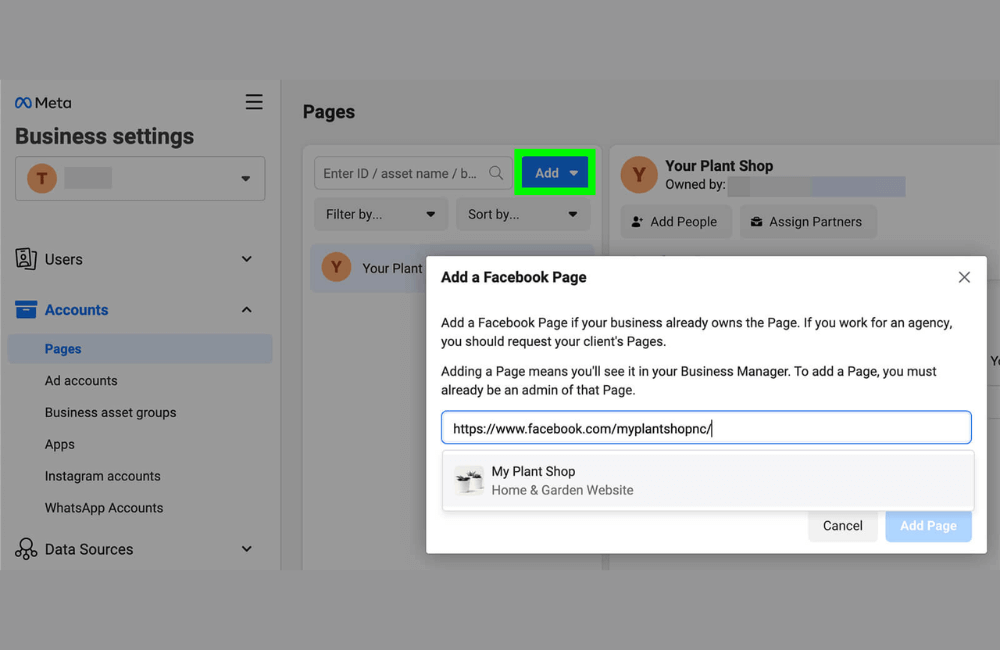
We recommend that you add a Facebook Fanpage. In the Pages section, click Add and choose the appropriate option. Most advertisers will choose to add an existing Fanpage. The process is very simple. You just need to paste the Fanpage URL or enter the Fanpage name, then submit the request. If you are an admin of that Fanpage, you will receive a notification and an email to approve. After confirmation, the Fanpage will be added to the Business Manager and ready to use for advertising.
For example, if you are doing business in financial services, real estate, or e-commerce, the Fanpage is the face of your brand when running ads, so ensure that the Facebook Page setup is polished with basic content and clear information.
Connect Instagram account
After the Fanpage, the next step is adding an Instagram account. An important note is that Instagram must be in Professional mode (Business or Creator). If your account is currently personal, Meta will request a conversion, which is completely normal and necessary for running ads.
You only need to log in to Instagram, grant permissions to the Business Manager, and complete the process. There is no need to wait for approval from other admins. Once connected, your ads can be displayed simultaneously on Facebook and Instagram, including Feed, Stories, and Reels.
Create or add an Ad Account
The third important asset is the ad account. You can create a new ad account or add an existing one. When creating a new one, pay special attention to the time zone and currency, as these two factors are almost impossible to change later. If you have ever boosted a post or run ads before, you most likely already have an ad account. In this case, simply enter the Ad Account ID and send a request for the current admin to approve.
3 core assets that every advertiser needs are a Facebook Fanpage, an Instagram account, and an ad account. Advanced assets such as WhatsApp, Data Sources, or Catalog can be added after things are running stably.
Manage Users and secure Permission Assignment.
If you are currently the only one running ads, the People section is not yet very important. However, when working with a team or an agency, you should add users via Facebook email and assign clear permissions for each asset. This method helps you avoid sharing personal accounts while reducing the risk of losing control of the Business Manager. This is a management principle that professional advertisers always apply.
Ad placement setup
When reaching the Placements section, many beginners easily get confused due to the numerous options. We recommend that if you are running Leads or Sales objectives and already have a tracking Pixel, you should use Advantage+ Placements (default).
Meta will automatically distribute ads to positions likely to yield the best results. Conversely, if you are only running Traffic and cannot measure conversions, you should consider removing Audience Network to avoid low-quality traffic. Ad prices always operate based on supply and demand. Cheap placements are often where few advertisers want to appear, and they do not always bring effectiveness.
Finalizing ads at the ad level and avoiding common mistakes
The ad level is where it is decided what users will see. First, ensure that the display identities, such as the Fanpage and Instagram accounts, are correct. This is a mistake many advertisers make when running ads in a hurry. We recommend that beginners create new ads instead of using existing posts, as ads need a clear CTA and more flexibility than organic content. The simplest format to start with is a single image or video.
For example, with mentoring offers or high-end services, personal images combined with testimonials will create much better credibility than stock photos.
Write ad copy and leverage AI selectively
The Primary Text should be concise, hit the problem, clearly state benefits, and include a CTA. You can add multiple content versions for Meta to optimize distribution. Meta’s AI is very powerful, but we always emphasize that you need to review the content before using it. Not every AI suggestion is suitable for the brand or policy. Treat AI as an assistant, not the final decision-maker.
Check Pixel and publish the campaign
Before clicking Publish, double-check the Pixel, URL, and tracking parameters. For beginners, complex tracking setups are not necessary. Most importantly, data must be recorded accurately. After publishing, the ads will be reviewed. With new accounts, the review time may be longer. Once the ads are active, monitor costs and results, and optimize gradually based on data instead of making constant edits based on intuition.
Facebook advertising in 2026 is no longer a game of intuition but a combination of strategic thinking, policy compliance, and effectively leveraging the Meta ecosystem. When you master the core principles from the start, optimizing costs, scaling, and maintaining a stable account will become much easier.
Frequently asked questions
Not necessarily. For beginners, you only need to clearly understand account structure, basic policies, and standard campaign setup. Advanced settings can be optimized gradually once you have data and experience.
It is more difficult in terms of control and policies, but easier if you do it right from the start. Meta is increasingly automating, so advertisers only need to focus on content, standard tracking, and clear objectives to achieve effectiveness.
💬 Contact now for free consultation from BHW!
- Website: https://vi.blackhatworld.io/
- Telegram: @bhw_agency
- Whatsapp: +84819001811
- Wechat: bhwagency
- Email: [email protected]
This article is also available in other languages:


