Facebook Housing Ads: Navigating the Special Ad Category Rules

Facebook was once involved in major controversies related to the Fair Housing Law, especially regarding how the platform allowed advertisers to target audiences in the past. Consequently, Meta introduced the Special Ads Category and mandated its application in sensitive sectors, including credit, employment, housing, and related industries.
If you are running real estate ads, especially lead generation ads for housing, you are likely familiar with enabling this special ad category. This is no longer an option but a mandatory requirement if you want to continue advertising on Facebook. However, the big question many advertisers face is: what exactly is the Special Ads Category, and how can you still generate quality leads at a reasonable cost within these strict limitations?
In this article, BlackHatWorld will clarify the core rules of the Special Ads Category with you, while guiding you on how to implement real estate ads that follow policy yet still achieve high efficiency. If done correctly, we can completely create a quality Facebook Ads strategy for real estate potential customers and maintain sustainable profits, as long as you know how to optimize the conversion process and handle leads effectively afterward.
Facebook Housing Ads: Navigating the Special Ad Category Rules
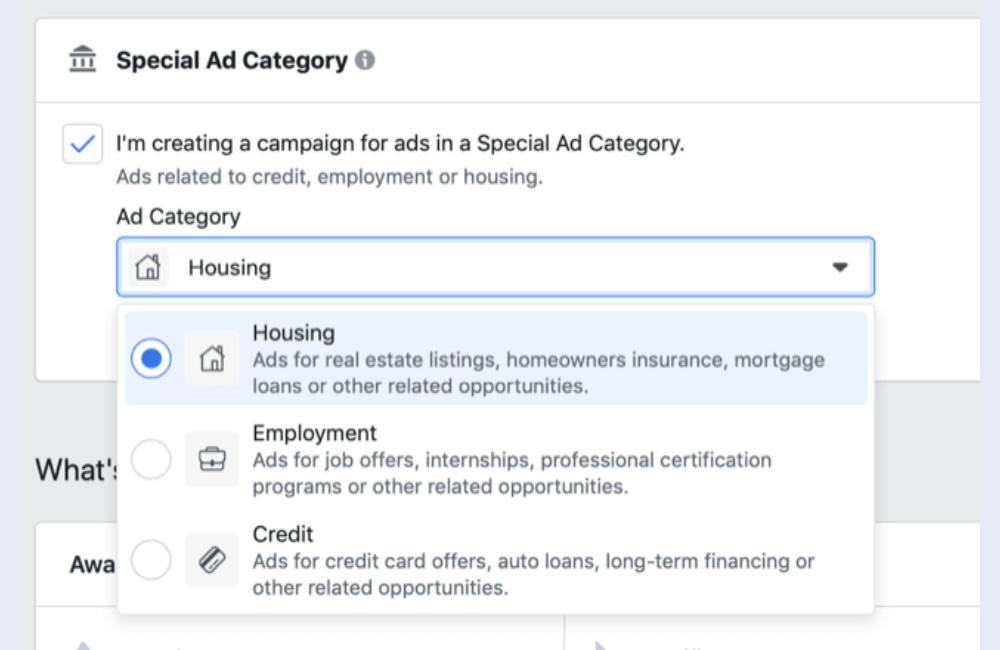
When creating a new campaign, you click Create, select the Conversions objective, and then click Continue. Right at the Campaign level, Facebook will display a very important section called Special Ad Category. Here, Facebook requires you to declare if your ads are related to one of the following fields:
- Credit
- Employment
- Housing
- Social issues, elections, or politics
By default, Facebook leaves this blank and assumes that your ads do not belong to any special category. This is only safe if your ad content is truly unrelated. However, if you are running real estate leads, project ads, houses for rent, or houses for sale, then Housing must be selected.
Why did Facebook create Special Ad Categories?
Facebook introduced Special Ad Categories to limit targeting methods that could lead to discrimination. Examples include targeting low-income people for low-cost housing ads, or excluding a certain age group when advertising housing. It may sound “rigid,” but Facebook’s goal is to protect users. And the reality is that in the future, it is highly likely that Facebook will continue to expand or further tighten these categories. Therefore, at present, correct declaration is even more important than target optimization.
The Ad Set Changes when you select the Housing Category
Before selecting the Special Ad Category, if you go down to the Ad Set level, the Audience section will look exactly like regular advertising campaigns. You can target quite freely. Now, go back to the Campaign and select Housing. Facebook will display an additional explanation about this category, mainly revolving around anti-discrimination. You should read it carefully, especially if you work in real estate long-term.
Returning to the Ad Set, in the Audience section, you will see Facebook display a warning when using Custom Audiences, essentially saying: “When using a Custom Audience, ensure your audience selection is not discriminatory.” This applies to most familiar files that advertisers often use, such as:
- Email upload lists
- Website visitors from pixel
- App activity
- Video viewers
- People interacting with Fanpage or Instagram
Facebook inherently dislikes discrimination but with housing ads, they control it much more strictly.
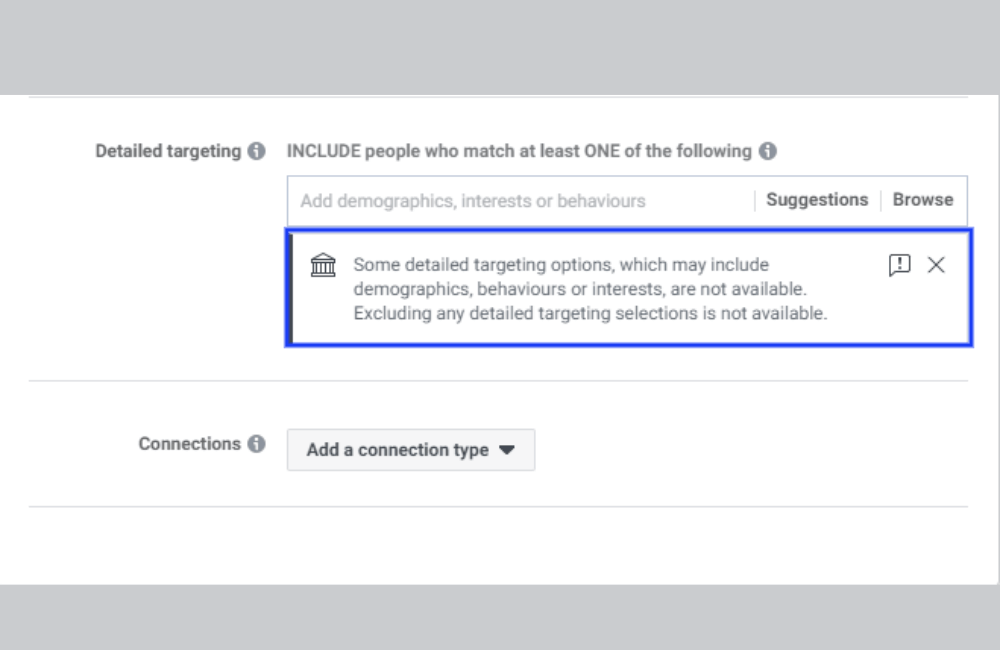
A very important change when running housing ads is in the Detailed Targeting section. Facebook will notify that: “Some detailed targeting options are unavailable.” To put it simply, you cannot use as many demographic, interest, and behavior groups as before. The list of restricted targets is not fixed and is regularly updated by Facebook to become increasingly strict.
The interesting point is that Facebook also does not allow you to run completely broad targeting within Special Ad Category. This means you are required to select certain conditions, but you are not allowed to use the full range like regular ads. This is a point that makes many advertisers feel confused, but those are the rules of the game, and we must adapt.
Can you select multiple special categories at the same time?
The answer is yes. At the campaign level, Facebook allows you to select multiple Special Ad Categories simultaneously, for example, both Housing and Credit if your ad is related to home loans. Once again, we emphasize: if you are unsure, declare it. Being limited in targeting is still much easier to handle than having to appeal a disabled account. Facebook places the special ad category at the campaign level because not every campaign in an account is the same. For example:
- One campaign used to recruit real estate brokers
- One campaign is running branding for the fanpage only
Separating at the Campaign level helps Facebook manage policies more accurately while allowing you flexibility in setting up many different campaigns.
Another question we receive very frequently from advertisers: “I am not sure if the ads campaign for painting business belongs to the Housing special category or not?” The answer is very simple: If you are wondering, just declare yes. Being restricted in some targeting options is still much better than not declaring and letting Facebook conclude that you are violating policies. In fact, we have seen many accounts disabled just because Facebook rechecked and notified that: “Your ad is related to housing but did not declare a Special Ad Category. This is a policy violation.” And this happens more often than you think.
We advise you to click on each category and read Facebook’s requirements carefully. With Housing, they state very clearly the regulations related to content, targeting methods, and elements that must absolutely not be violated. The categories are generally quite similar, but there are still small differences that, if ignored, can easily lead to unnecessary risks.
Tips for setting up Win Ads for the Housing Ad Category on Facebook
Real estate advertising in the Special Ads Category – Housing is always a difficult problem for many advertisers. Targeting is limited, detailed demographics cannot be used, and deep behavioral optimization is no longer possible like before. However, through the process of practical implementation for many real estate agencies, we realize that if the structure is set up correctly, the right placement is chosen, and suitable creatives are used, housing ads can still win very stably.
Setting up campaign in Ads Manager
Now, we start directly in Ads Manager. We will go into the client’s ad account and create a new campaign. The objective of this ad type is very clear: promoting house listings to collect leads from people who actually need to view houses. Most common examples:
- House listings below a specific price point, for example, under $300,000
- Or house listings above a certain price point, serving a higher segment
This method is particularly effective for brokers who do not yet have many personal listings. In fact, you can still run ads for house listings even if you do not have a listing yet, as long as:
- You have the right to use images for advertising purposes
- Or in some states and certain brokerages, you are allowed to use stock photos according to regulations
Creating a standards campaign for Housing
In the first step, we select the correct ad account to use. Then, proceed to create a new campaign with the following settings:
- Campaign objective: Lead Generation
- Special ad categories: Housing
- Buying type: Auction
- Do not enable A/B Test
- Do not set a campaign spending limit
- Turn off Campaign Budget Optimization
The reasons we do not use CBO for real estate ads are:
- The budget for each campaign is usually quite low, commonly around 30 to 50 USD per day
- With this budget level, ABO allows for better and more stable control
In most accounts that we manage, the budget for housing ads accounts for a large proportion, and ABO always yields more controllable results than CBO.
Setting up Ad Set for Housing Lead generation campaigns
At the Ad Set level, we continue to use ABO, which means setting the budget directly at each ad group. Important settings:
- Do not use Dynamic Creative
- Let ads run immediately after approval
- This is cold lead generation, meaning generating leads from a completely new customer group
Target by Geographic Location
The targeting section in Housing is quite restricted, so we focus entirely on geography. Specific settings:
- Select People living in or recently in this location
- Example: Concord
- Minimum radius: 15 miles
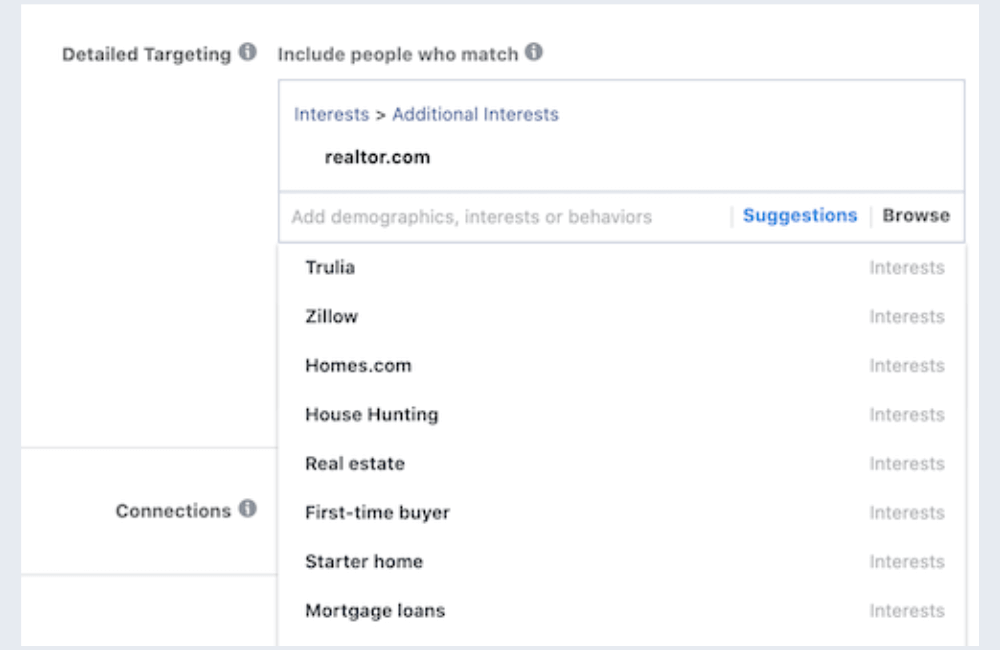
We do not use interest targeting for this type of ad. Although you might see interests such as:
- Zillow
- Trulia
- Homes.com
- House hunting
- First-time buyer
However, based on practical implementation experience, adding interests often:
- Increases cost per lead
- Does not significantly improve lead quality
Therefore, when running cold leads for real estate, the most effective way remains broad targeting by location and letting the algorithm self-optimize.
Placement
Placement is a section where many advertisers make mistakes. Instead of leaving it as Automatic Placements, we always switch to Manual Placements and refine as follows:
- Remove Instagram
- Remove Audience Network
- Remove Video Feeds
- Remove Facebook Stories
Only keep:
- Facebook News Feed
- Facebook Marketplace
Reality shows that when leaving it as Automatic Placements, after a few days Facebook also automatically pushes the majority of the budget into News Feed and Marketplace. The remaining placements only make you waste money on testing without bringing in quality leads.
Creating simple but effective Ad Images with Canva
We often use Canva because it is fast, easy to edit, and suitable for teams. How to do it:
- Select the 1:1 ratio Instagram Post template
- Use a 4-square grid layout
- Upload 4 house images
Image arrangement order:
- Top left: the most beautiful house
- Top right: the second most beautiful house
- Bottom left: kitchen or impressive living space image
- Bottom right: house matching the price segment being advertised
An extremely important note for advertisers:
- If you advertise houses under 300,000 USD, the images must match that segment
- Do not use 500,000 to 600,000 USD mansion images
Images that do not meet expectations will cause viewers to give negative feedback, reducing ad quality and increasing lead costs.
Write Ad Content that hits the Buyer’s Needs
Ad content should be concise, direct, and focused on practical benefits. An effective content structure usually includes:
- Emphasize regional location
- Speak directly to people looking to buy a home
- Clearly mention the list of homes under price X
- Highlight several units with down payment assistance
- Clear call to action: click to receive the free list and real-time updates
Create Lead Forms to optimize completion rates
In the lead form section, we usually choose:
- More Volume if there is an ISA team to call leads
- For solo brokers, more volume is still a suitable choice
- Large teams can test higher intent further
Simple form title: Get your free home list
Question structure following the micro-commitment principle:
- Name
- Phone number
Name and email are low commitments, phone number is the highest commitment. This arrangement helps increase the form completion rate. A small but very effective tip is to add the line “Step 2 of 2” in the form description. This creates a sense of nearly finishing, making users less likely to abandon the form halfway.
Thank You Page and post-lead processing
After submitting the form:
- Do not redirect to the website
- Redirect to Facebook Page
- Call to action for users to like the page
This method helps keep leads within the Facebook ecosystem and increases trust points for the broker’s personal brand.
Duplicate ad set to find win ads
After completing one ad sample, we usually:
- Duplicate into 3 ads
- Apply when the minimum budget is 15 USD per day or more
Facebook will automatically distribute each ad into different traffic groups. As a result, you can easily detect which ad sample has the best performance to scale.
Finalize and connect the lead processing system
After double-checking all settings, we proceed to Publish. The final but extremely important step:
- Connect ads with CRM
- Ensure no loss of leads and data
Many advertisers generate cheap leads, but they do not result in transactions because they do not process leads correctly. If you are facing that situation, focus on optimizing the backend conversion stage, as that is where the real profit of real estate advertising is decided.
Housing ads on Facebook within the Special ad category are certainly not as easy as before, but they are absolutely not impossible to run effectively. When you master the Special ads category rules, set up the campaign with the right structure, choose suitable placements, and focus on creatives that closely match the actual needs of homebuyers, lead costs can still be well-controlled, and campaigns remain profitable. Most importantly, remember that advertising is only the first step; the ability to handle and convert leads is the factor that determines long-term success.
Frequently asked questions
Yes. If you run ads related to housing, real estate, rentals, or lead generation for home buying and selling, you must select the Housing category. Otherwise, ads are likely to be rejected, or accounts may be restricted.
In the Housing category, targeting broadly by geographic location combined with clear ad content about price, area, and housing needs, will help Facebook automatically filter the right group of interested people. Lead quality mainly comes from creatives, messaging, and the follow-up lead handling process, not just from targeting.
💬 Contact now for free consultation from BHW!
- Website: https://vi.blackhatworld.io/
- Telegram: @bhw_agency
- Whatsapp: +84819001811
- Wechat: bhwagency
- Email: [email protected]
This article is also available in other languages:


