How to Check the Quality of A Facebook Ad Account: 2026 Guide
As Facebook increasingly prioritizes user experience and tightens control over advertising activities, ad account quality has become a vital factor determining campaign effectiveness. Especially in 2026, many accounts still have budgets, but ads do not distribute, costs rise, or they are suddenly restricted simply because quality scores drop without the owner knowing.
In this article, BlackHatWorld will explore with you how to check the quality and status of your ad account system based on real-time data, helping advertisers detect risks early, optimize performance, and maintain sustainable accounts over time.
Account Quality section in Facebook Settings
Account Quality is one of the most important areas that advertisers need to check regularly if they want to maintain stable accounts and run ads long-term. In this section, we will help you clearly understand what Account Quality is, how it works, and why it directly affects your Facebook ad account.
What is Account Quality, and what is it used for?
Account Quality is where Facebook monitors, evaluates, and strengthens compliance with policies, including Advertising Policies, Commerce Policies, Community Standards, and other terms of the platform. This is also the area that helps advertisers track feedback from users regarding their ads and business activities. For example, if your ad is reported as misleading, violating sensitive content, or providing a poor experience, this feedback can be recorded and displayed in Account Quality so you can make timely adjustments.
Why does Account Quality play an important role?
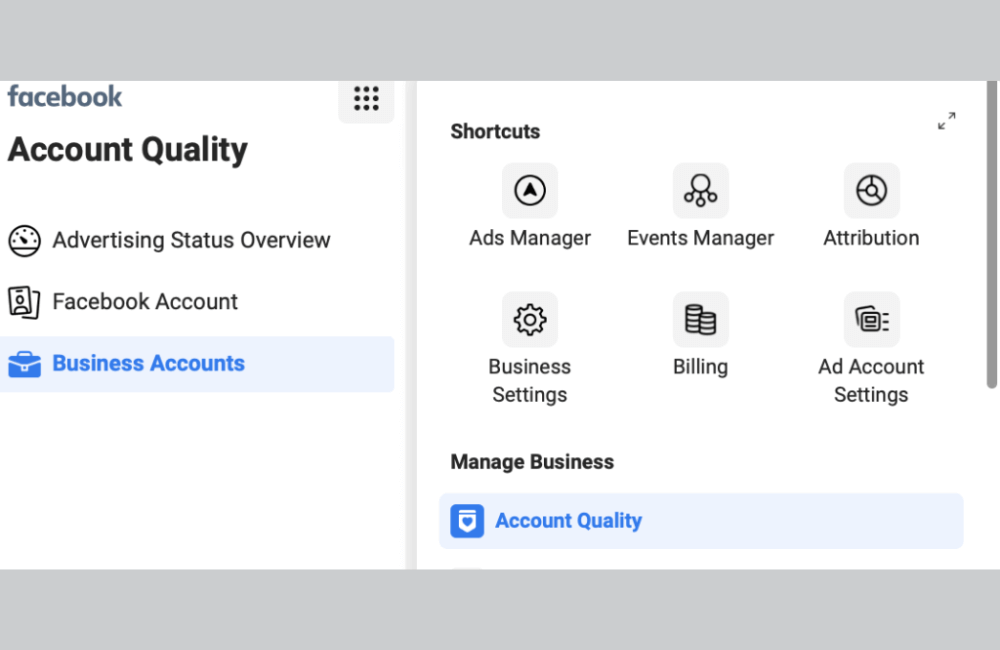
Facebook uses Account Quality to limit the display of low-quality ads that have the potential to harm users or affect the advertising ecosystem. Thanks to this, the platform ensures a safe and transparent environment for both users and businesses. For you, Account Quality is the “health chart” of the account. When the metrics here are good, ads usually distribute more stably, costs are easier to control, and there is less risk of sudden restrictions.
How Account Quality evaluates and reviews accounts
Account Quality reviews ads based on current advertising policies while monitoring the entire activity of the advertiser over time. Not just individual ad samples, Facebook also evaluates the overall behavior of the account, such as violation frequency, landing page content, negative feedback from users, or appeal history. If an account repeatedly violates policies, Account Quality can apply measures such as restricting distribution, rejecting ads, or even disabling the account.
Types of Restrictions and Disabling from Account Quality
Account Quality has the right to restrict or disable accounts that do not comply with Advertising Policies, Facebook Community Standards, Instagram Community Guidelines, or other terms. This can happen to ad accounts, business accounts, Facebook Pages, or product catalogs. For example, an advertiser in the financial sector who fails to correctly declare a special ad category or uses misleading content about financial benefits is very likely to be flagged and placed under monitoring in Account Quality.
Account Quality provides an overview of Account Status
The new Account Quality dashboard provides a consolidated view of all issues related to ad accounts and Pages, especially factors that can reduce ad delivery. Instead of checking multiple locations, we and you, and I only need to access a single screen to know where the account is at risk. For example, if ads suddenly experience decreased delivery or are continuously rejected, Account Quality will display specific causes such as policy violations, sensitive content, or Page-related issues.
Page Admin can view and review the most recent accounts or content that need attention due to non-compliance with advertising policies or other Facebook standards. Account Quality has been integrated into Business Manager for quite some time, and Page managers can also view a list of similar issues directly within the Business Page tool. This helps advertisers, marketing teams, or agencies easily collaborate when handling incidents, especially in large campaigns or sensitive niches.
Important information displayed in Account Quality
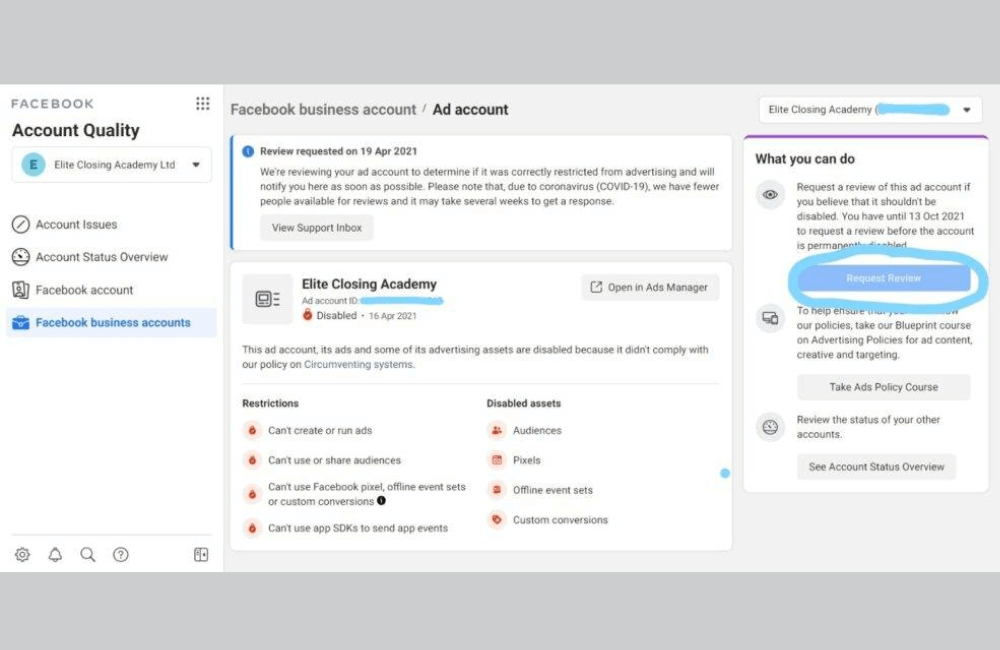
Account Quality provides a fairly complete summary of account and content status, including:
- Account Quality provides a fairly complete summary of account and content status, including:
- Recent Community Standards violations, such as misleading content or industry regulation violations.
- Content shared by the Page that has been rated as false by independent fact-checkers.
- Violations related to intellectual property rights, such as using unlicensed images, videos, or brands.
- Content identified as baiting, misleading, or manipulating user behavior.
- Violations due to sharing too much content from external sources without added value.
- Ongoing events affecting the Page or ad accounts.
- Job postings are rated as misleading, deceptive, or fraudulent.
- Content ineligible to be recommended or widely distributed by Facebook.
For example, if your Page frequently reposts content from other websites without editing or adding value, Account Quality may record this as a violation and directly affect your ads.
In essence, this is not a completely new update, as most of the data existed previously. However, gathering all information into a visual dashboard helps advertisers track issues more easily and handle them faster. Thanks to a clear layout and better visibility, we and you can promptly detect risks to optimize accounts and write appeals to the Facebook support team before it is too late. This helps campaigns be distributed more stably, costs be better controlled, and minimizes the risk of accounts being restricted or disabled.
How to Check the Quality of A Facebook Ad Account: 2026 Guide
When operating Facebook ads, we understand that the top concern for advertisers is whether their accounts are in a safe and stable state. An ad account with good quality not only helps campaigns distribute evenly, but also reduces the risk of restrictions, ad rejections, or sudden account lockouts. Below, we will guide you on how to check Facebook ad account quality according to the latest Meta Business Suite interface in 2026, accompanied by practical examples for easy application.
Step 1: Identify the correct management area in Meta Business Suite
After logging into Meta Business Suite, advertisers will see many different tools. To start, we need to access the general management area by clicking on All Tools. This is where Meta centralizes the most important features for businesses.
However, because Meta has changed the interface, the Account Quality section is no longer displayed directly as before. This leads many advertisers to mistakenly believe that this feature has been removed, while in fact it has only been moved to another location.
Step 2: Access the support center to reopen Account Quality
From the tool list, we continue to click on Business Support Home. This action will open a new tab leading you to Meta’s business support center.
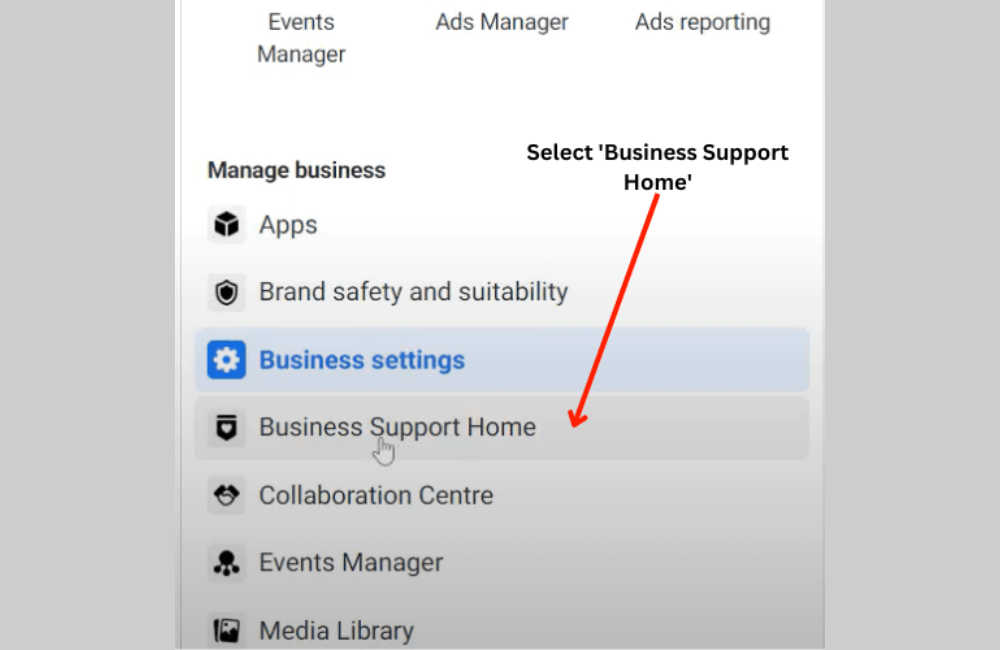
Currently, this is the most accurate and fastest access point to reopen the Account Quality section. After the page finishes loading, the Account Quality part will display right on the overview interface, allowing advertisers to check the entire account status in just a few seconds.
Step 3: Get familiar with the new account quality check layout
When going deep into Account Quality, you will see that Meta displays information in an overview format instead of leading directly to a fixed account as before. This helps us easily manage more assets within the same interface. At the top of the screen, there is an account switcher button. Here, you can choose between a personal account or a business account, depending on the object that needs to be checked.
For example, if you are running ads for small fanpages or personal ad accounts, choose a personal account. Conversely, if you manage multiple campaigns for clients through Business Manager, switch to the business account to view the full related status.
Step 4: Evaluate the status of the fanpage, ad account, and Business Manager
After selecting the correct account, the familiar Account Quality interface will appear. Here, we can monitor in detail the status of each fanpage, ad account, or Business Manager that is owned or granted administrative rights.
The entire asset list will be clearly displayed. For agencies or advertisers managing multiple projects at the same time, you only need to switch between items to quickly check which accounts are facing warnings and which ones are operating stably.
Additionally, Meta also allows for checking other Business Managers, which is very suitable for teams running multiple industries or multiple markets in parallel.
Step 5: Complete the check and monitor account health periodically
With just a few simple steps within 2 to 3 minutes, advertisers can fully check Facebook ad account quality on the new interface. Although Meta continuously updates the system, Account Quality remains the core tool that helps us monitor warnings, detect risks early, and maintain campaign stability in 2026.
Checking Facebook ad account quality is no longer an “only when there is a problem” operation, but should become a regular habit for advertisers. By knowing exactly where the Account Quality section is located in the new Meta Business Suite, you can quickly detect warnings, minimize risks, and keep your campaigns running stably in 2026.
Frequently asked questions
We recommend checking at least 1–2 times per week, especially before scaling budgets or deploying campaigns for sensitive industries, to timely handle any arising warnings.
Not necessarily. Account Quality only reflects violations and restrictions recorded by the system. You still need to comply with content policies, ad frequency, and payment history to maintain long-term account reliability.
💬 Contact now for free consultation from BHW!
- Website: https://vi.blackhatworld.io/
- Telegram: @bhw_agency
- Whatsapp: +84819001811
- Wechat: bhwagency
- Email: [email protected]
This article is also available in other languages:


